Les meilleurs CRM pour les organisations à but non lucratif : le guide complet pour les organisations à but non lucratif

Au cœur de toute association se trouvent la compassion et l'esprit de communauté : des personnes qui s'unissent pour résoudre des problèmes concrets. Mais même les équipes les plus dévouées rencontrent des difficultés lorsque les données sont éparpillées, que les mises à jour sur les bénévoles ne sont pas synchronisées et que la communication devient réactive plutôt que planifiée. Un bon CRM pour les associations centralise les relations, les activités et les données dans un système unique, permettant aux équipes de mieux communiquer et d'agir avec intention.
Le saviez-vous ? Les études montrent que les associations sans système centralisé perdent près de la moitié de leurs donateurs en moins d'un an, car le suivi et l'engagement personnalisé deviennent trop complexes à gérer manuellement.
La conclusion est simple : la technologie n'est plus une option pour garantir un impact durable. Choisir le bon CRM pour votre association favorise la continuité, la transparence et le renforcement des relations avec vos donateurs et bénévoles sur le long terme.
Ce guide se veut une ressource pratique et durable pour les associations à chaque étape de leur développement. Que vous soyez en phase de lancement ou déjà bien établi, les cadres et conseils présentés ici se concentrent sur ce qui reste immuable : votre mission, vos équipes et votre capacité à rester en contact. Le bon CRM apporte de la structure à votre travail, avec clarté et sérénité.
Qu'est-ce qu'un CRM et pourquoi les associations en ont-elles besoin ?
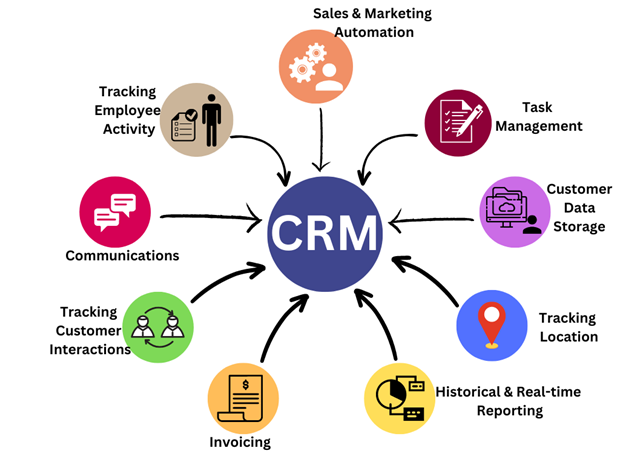
Un CRM pour les associations est un système centralisé qui aide les organisations à gérer leurs relations avec les donateurs, les bénévoles, les partenaires et les sympathisants. Il regroupe les contacts, les communications, les dons, les événements et l'historique d'engagement en un seul endroit, permettant aux équipes de travailler avec clarté plutôt que de jongler avec des feuilles de calcul éparpillées.
À mesure que les associations se développent, le suivi manuel devient rapidement un frein. Les informations deviennent obsolètes, les suivis passent à la trappe et les équipes passent plus de temps à gérer des données qu'à tisser des liens. Un CRM conçu pour les associations résout ce problème en organisant les informations, en automatisant les tâches routinières et en facilitant le suivi et la mesure de l'engagement.
La véritable valeur d'un CRM réside dans la compréhension des personnes, et non dans le simple stockage de données. Lorsque les interactions sont centralisées dans un seul système, les équipes peuvent identifier des tendances, personnaliser leurs échanges et prendre de meilleures décisions en matière de collecte de fonds, de bénévolat et de communication. C'est souvent ce qui fait la différence entre un engagement ponctuel et un soutien à long terme.
Les CRM favorisent également la responsabilité. Les bailleurs de fonds, les conseils d'administration et les équipes de direction attendent des rapports clairs sur l'impact et les résultats. Grâce à des données structurées et des outils de reporting intégrés, les associations peuvent partager des informations précises sans avoir recours à un travail manuel fastidieux ou à des approximations.
Pour les petites équipes ou les organisations en phase de démarrage, se lancer ne signifie pas nécessairement un investissement lourd. De nombreux outils proposent des options CRM simples et accessibles qui aident les équipes à adopter de bonnes habitudes de gestion des données et à évoluer au fil du temps. Étudier des exemples concrets de plateformes CRM peut aider les associations à choisir un système adapté à leur taille, leurs objectifs et leurs capacités.
En fin de compte, le meilleur CRM pour une association n'est pas une question de fonctionnalités ou de tendances. Il s'agit de rester organisé, de maintenir la confiance et de libérer du temps pour que les équipes puissent se concentrer sur ce qui compte vraiment.
Vous souhaitez comprendre comment les organisations leaders stimulent l'engagement et l'impact ? Téléchargez dès aujourd'hui le rapport sur l'état du bénévolat en entreprise.
10 fonctionnalités clés que tout CRM associatif devrait posséder
Trouver le meilleur CRM pour votre association devient beaucoup plus simple lorsque vous vous concentrez sur ce qui soutient réellement votre travail quotidien. Plutôt que de courir après de longues listes de fonctionnalités, les associations tirent le meilleur parti des outils qui renforcent les relations, simplifient les opérations et facilitent le suivi de leur impact.
Un CRM bien conçu pour les associations centralise les données des donateurs, des bénévoles et des événements sur une plateforme unique. Des fonctionnalités essentielles comme la gestion des donateurs et des bénévoles, l'automatisation des communications, la segmentation et le reporting aident les équipes à rester organisées et réactives sans complexité inutile. Lorsque les actions de sensibilisation s'appuient sur des données réelles, l'engagement devient plus personnel, cohérent et durable.
1. Outils de gestion des donateurs
Une gestion efficace des donateurs est au cœur de tout CRM pour associations. Ces outils permettent aux équipes de maintenir des profils complets, de suivre l'historique des dons, de surveiller les promesses de dons et de consigner chaque interaction en un seul endroit. Grâce à des dossiers clairs et une segmentation intelligente, les associations peuvent identifier des tendances, remercier leurs soutiens au bon moment et relancer les donateurs avant que la relation ne s'essouffle. Le résultat est une communication réfléchie, personnelle et opportune, plutôt que réactive.
2. Flux de travail de communication automatisés
L'automatisation soulage les petites équipes tout en assurant une constance dans l'engagement. Grâce aux flux de travail automatisés, les associations peuvent programmer des e-mails de bienvenue, des reçus de dons, des rappels de renouvellement et des messages de remerciement sans suivi manuel. Cela garantit que vos soutiens reçoivent des nouvelles aux moments opportuns, réduit les tâches répétitives et permet de maintenir une communication régulière et significative qui renforce le lien avec la mission.
3. Fonctionnalités de gestion des bénévoles
Un CRM pour associations devient bien plus précieux lorsqu'il prend en charge les bénévoles en plus des donateurs. Des fonctionnalités telles que le suivi des heures de bénévolat, le marquage des compétences, la gestion des inscriptions et le suivi des disponibilités rendent la coordination plus simple et plus intentionnelle. Consigner les retours et les notes d'impact permet également d'orienter les bénévoles vers les missions où ils peuvent contribuer le plus efficacement, améliorant ainsi leur satisfaction et leur engagement à long terme.
4. Suivi et gestion des événements
Des collectes de fonds aux programmes communautaires, les événements jouent un rôle majeur dans le travail associatif. Les outils de gestion d'événements intégrés à un CRM aident les équipes à gérer les inscriptions, envoyer des rappels, suivre la participation et évaluer les résultats. En capturant les données d'engagement avant, pendant et après les événements, les associations peuvent identifier ce qui fonctionne, affiner leur planification future et tisser des liens plus forts avec les participants.
5. Segmentation personnalisée
La segmentation aide les associations à s'adresser aux personnes en tant qu'individus plutôt qu'en tant que listes. Qu'il s'agisse de regrouper les nouveaux donateurs, les soutiens récurrents, les contributeurs inactifs ou les bénévoles engagés, la segmentation rend la communication plus pertinente et efficace. À terme, cela conduit à des taux de réponse plus élevés, des relations plus solides et une compréhension plus claire de ce qui motive les différents soutiens.
6. Reporting et indicateurs exploitables
Un reporting clair transforme les données en orientations stratégiques. Les tableaux de bord et les outils d'analyse permettent aux associations de suivre en un coup d'œil la fidélisation des donateurs, les résultats des campagnes, la participation des bénévoles et les tendances des revenus. Ces informations favorisent une planification plus intelligente, des demandes de subventions plus solides et une communication sur l'impact plus crédible, surtout lorsque la transparence et la précision sont essentielles pour les conseils d'administration et les financeurs.
7. Stockage centralisé pour les témoignages et les ressources d'impact
Au-delà des chiffres, les associations s'appuient sur des histoires pour inspirer l'action. Un CRM qui stocke les témoignages, photos, vidéos et notes d'impact en un seul endroit facilite le partage de mises à jour cohérentes et percutantes. Qu'il s'agisse de créer des newsletters, des rapports ou des présentations, les équipes peuvent rapidement faire ressortir des histoires réelles qui donnent vie à leur travail.
8. Conception conviviale et adoption facile
La facilité d'utilisation détermine souvent si un CRM sera adopté ou délaissé. Le meilleur CRM pour les petites associations est celui qui semble intuitif dès le premier jour, avec des tableaux de bord clairs et une navigation simple. Lorsque le personnel et les bénévoles se sentent à l'aise avec le système, les données restent précises, la communication s'améliore et le CRM devient un outil de travail quotidien plutôt qu'une contrainte supplémentaire.
9. Intégration avec les outils existants
La plupart des associations utilisent déjà des outils pour l'e-mail, les dons, la comptabilité et le marketing. Les intégrations CRM permettent à tout ce système de fonctionner de concert, réduisant la saisie de données en double et maintenant les informations à jour sur toutes les plateformes. Cette approche connectée permet de gagner du temps, de minimiser les erreurs et d'offrir aux équipes une vision globale lors de la prise de décision.
10. Sécurité des données et conformité
La confiance repose sur la qualité de la protection des données. Un CRM fiable intègre des fonctionnalités de sécurité telles que le chiffrement, les accès basés sur les rôles et les pistes d'audit pour protéger les informations des donateurs et des bénévoles. Ces protections sont essentielles, non seulement pour la conformité, mais aussi pour assurer aux soutiens que leurs données sont traitées de manière responsable.
Le rapport d'impact est une fonctionnalité souvent négligée par les associations. Les soutiens restent plus facilement engagés lorsqu'ils peuvent constater la différence qu'ils contribuent à créer. Les CRM qui permettent aux équipes de stocker des témoignages, des photos et des statistiques d'impact facilitent la mise en avant des résultats. Cela rejoint les enseignements des webinaires de Goodera sur l'engagement des bénévoles, où les leaders soulignent que le storytelling et les mises à jour visuelles aident à maintenir le soutien et la participation sur le long terme.
Consultez également notre guide complet sur le rapport d'impact pour comprendre comment mesurer et communiquer efficacement vos résultats : Rapports d'impact 101 : Tout ce qu'il faut savoir pour mesurer et partager votre impact
Les associations doivent également privilégier la convivialité. Un CRM peut offrir des outils puissants, mais si votre équipe a du mal à l'utiliser, son adoption sera difficile. Les plateformes dotées d'interfaces intuitives, d'une prise en main facile et d'une navigation simple garantissent que chacun, des responsables de programme aux bénévoles, puisse contribuer régulièrement. Le système devient ainsi un atout partagé plutôt qu'un outil spécialisé réservé à quelques-uns.
En résumé, un excellent CRM destiné aux associations aligne ses fonctionnalités sur leur raison d'être. Il renforce les relations, simplifie le travail et donne à votre équipe la structure nécessaire pour se développer. Lors de l'évaluation des plateformes, gardez votre mission et vos flux de travail à l'esprit, et choisissez un système qui soutient votre vision à long terme tout en restant pratique pour un usage quotidien.
Comment les CRM améliorent l'engagement et l'impact des associations
Un CRM pour associations aide les organisations à tisser des liens plus forts avec leurs donateurs et bénévoles en personnalisant la communication, en suivant les tendances d'engagement et en simplifiant la mesure de l'impact. Lorsque les équipes comprennent clairement les préférences et les motivations de leurs soutiens, chaque interaction devient plus significative et axée sur l'objectif.
L'engagement devient puissant lorsqu'il semble intentionnel plutôt que routinier. Un bon CRM rend cela possible en enregistrant l'historique des soutiens, leurs préférences de communication et leurs tendances de participation. Cela aide les équipes à envoyer des messages qui semblent personnels et pertinents, et non génériques ou transactionnels. Lorsque les soutiens se sentent reconnus, leur confiance et leur implication se renforcent naturellement.
Dans le webinaire de Goodera “Communication interne pour la RSE” , Missy Peck, directrice principale de l'engagement mondial chez Goodera, a souligné que la clarté et la personnalisation sont les moteurs les plus puissants d'un engagement constant. Son analyse montre comment un CRM aide à mettre à l'échelle une communication réfléchie en automatisant des points de contact opportuns et pertinents qui permettent aux soutiens de se sentir reconnus.
La mesure de l'impact devient également beaucoup plus claire avec un CRM. Les tableaux de bord en temps réel aident les associations à suivre avec précision l'activité des donateurs, les heures de bénévolat, la participation aux événements et les résultats des programmes. Il est ainsi plus facile de créer des récits d'impact convaincants, de renforcer les appels aux dons et de maintenir la transparence auprès des soutiens. Lorsque les gens comprennent la différence que font leurs contributions, ils sont plus enclins à rester engagés et à accroître leur implication au fil du temps.
Les CRM améliorent également la collaboration interne en offrant aux équipes une visibilité partagée sur le parcours des donateurs et des bénévoles. Au lieu de travailler en silos ou de s'appuyer sur des données éparpillées, tout le monde peut accéder aux mêmes informations, attribuer des suivis et coordonner la communication. Cela réduit les doublons, améliore les délais de réponse et garantit une expérience plus unifiée pour les soutiens à chaque point de contact.
Le saviez-vous ? Les associations qui personnalisent leur communication via un CRM constatent jusqu'à 40 pour cent de fidélisation en plus des donateurs par rapport à celles qui s'appuient sur une gestion manuelle.
En résumé, un CRM transforme l'engagement en une pratique structurée et cohérente. Il aide les associations à communiquer avec intention, à démontrer leur impact plus efficacement et à bâtir des relations durables.
Comment choisir le meilleur CRM pour les associations
Choisir le meilleur CRM pour une association doit être une démarche réfléchie plutôt qu'une source de stress. Une approche structurée aide les équipes à identifier les outils qui correspondent à leurs objectifs, leurs flux de travail et leur vision à long terme. Pour simplifier ce processus, les associations peuvent suivre une méthode étape par étape qui permet de clarifier les priorités avant de prendre une décision.
1. Identifiez les principaux points de blocage de votre organisation
Chaque association fait face à des défis uniques, qu'il s'agisse de la fidélisation des donateurs, du suivi des bénévoles, de la coordination d'événements ou du reporting de campagnes. Commencez par lister les domaines où votre équipe ressent le plus de pression. Comprendre ces lacunes vous aidera à cibler les options de CRM qui répondent directement à vos besoins réels, sans vous submerger de fonctionnalités inutiles.
2. Évaluez la taille et la capacité de votre équipe
Les petites associations tirent souvent profit de CRM légers et intuitifs qui simplifient les tâches quotidiennes, tandis que les organisations plus grandes peuvent avoir besoin d'automatisation avancée, d'intégrations poussées et d'analyses détaillées. C'est ici que le choix du meilleur CRM pour les petites structures devient pertinent. Opter pour un système adapté à la capacité de votre équipe garantit une adoption plus fluide et une réussite sur le long terme.
3. Comparez attentivement le coût et la valeur
Le budget est un facteur déterminant pour la plupart des associations. Si un CRM gratuit peut offrir des fonctionnalités de base solides, les plateformes payantes proposent généralement une automatisation plus robuste, des rapports plus approfondis et une meilleure évolutivité. Évaluez si votre équipe a besoin d'une solution simple et gratuite, ou d'un outil avancé justifiant un investissement à long terme.
4. Pensez à la pérennité à long terme
Un CRM doit évoluer avec votre organisation. Changer de système chaque année peut être coûteux et perturbant. Recherchez des plateformes offrant une évolutivité, un support fiable et des fonctionnalités flexibles capables de s'adapter à la croissance de votre association. Choisir pour l'avenir garantit la stabilité de votre socle numérique.
5. Analysez les besoins en intégration et en compatibilité
La plupart des associations utilisent des outils pour l'email marketing, les dons, la comptabilité, l'inscription des bénévoles et la gestion d'événements. Assurez-vous que votre CRM s'intègre facilement à ces outils pour réduire le travail manuel et maintenir la cohérence des données sur toutes les plateformes.
Le meilleur CRM pour une association est celui qui s'aligne sur votre mission, simplifie vos flux de travail quotidiens et soutient votre pérennité. Une sélection réfléchie garantit à votre équipe la structure nécessaire pour tisser des liens solides et renforcer son impact.
Découvrez également : Stratégie de réseaux sociaux pour les associations : 11 bonnes pratiques pour accroître l'engagement pour apprendre comment les associations peuvent renforcer leur engagement numérique en complément de leur CRM.
Check-list pour évaluer les plateformes CRM
Une check-list devient essentielle lorsque les associations comparent des plateformes CRM, car elle aide à évaluer les outils de manière objective, plutôt que sur des critères émotionnels ou superficiels. De nombreux CRM semblent similaires en apparence, mais leur réelle valeur n'apparaît qu'à travers des critères structurés reflétant les besoins quotidiens des équipes associatives. Chaque point de cette check-list est inclus car il influence la réussite à long terme : les fonctionnalités déterminent ce que le CRM peut vous aider à accomplir, la facilité d'utilisation conditionne la rapidité d'adoption par votre équipe, les capacités d'intégration affectent la synergie de vos outils, et la sécurité protège la confiance que vos soutiens vous accordent. Sans une check-list claire, les associations risquent de choisir un CRM impressionnant lors d'une démonstration, mais inadapté aux besoins opérationnels après sa mise en place. Ce cadre garantit que chaque décision est fondée sur la clarté, la praticité et l'alignement avec votre mission.
Exemple de check-list d'évaluation CRM
- Fonctionnalités principales
Le CRM propose-t-il la gestion des donateurs, le suivi des bénévoles, la gestion d'événements, l'automatisation, la segmentation et le reporting ? Ces fonctionnalités garantissent que le système prend en charge de manière exhaustive vos activités de collecte de fonds et vos programmes. - Facilité d'utilisation
L'interface est-elle intuitive et votre équipe peut-elle la prendre en main rapidement ? Une plateforme conviviale favorise une meilleure adoption, réduit le temps de formation et assure une saisie de données cohérente. - Capacité d'intégration
Le CRM se connecte-t-il facilement aux processeurs de dons, aux outils marketing, aux logiciels de comptabilité ou aux portails de bénévoles ? Des intégrations fluides évitent les silos de données et rationalisent vos flux de travail. - Automatisation et personnalisation
Le CRM prend-il en charge les e-mails automatisés, les rappels, les parcours d'intégration et les messages personnalisés ? L'automatisation réduit le travail manuel et garantit que vos soutiens reçoivent des communications pertinentes et opportunes. - Sécurité des données et conformité
La plateforme offre-t-elle le chiffrement, des accès basés sur les rôles, des pistes d'audit et des garanties de conformité ? Une sécurité robuste protège les informations des donateurs et des bénévoles tout en préservant la crédibilité de votre organisation. - Reporting et analyse
Le CRM peut-il générer des tableaux de bord clairs, des analyses sur les donateurs, des résumés d'impact et des rapports d'engagement ? Un reporting solide renforce la transparence et facilite la prise de décision fondée sur les données. - Évolutivité
Le CRM pourra-t-il accompagner les besoins futurs de votre organisation ? Les plateformes évolutives évitent des migrations coûteuses et assurent la stabilité de votre infrastructure sur le long terme. - Support et formation
Le CRM propose-t-il un support client fiable, des sessions d'intégration, des tutoriels ou un chat en direct ? Un support solide permet à votre équipe de résoudre rapidement les problèmes et de maintenir sa productivité.
L'utilisation d'une liste de contrôle structurée permet aux organisations à but non lucratif de dépasser l'intuition pour évaluer les plateformes CRM avec confiance et clarté. En examinant les fonctionnalités clés, la facilité d'utilisation, les intégrations, la sécurité, l'évolutivité et le support, les organisations peuvent prendre des décisions durables qui renforcent réellement leurs opérations internes. Un CRM bien choisi devient bien plus qu'un simple outil : il devient un partenaire stratégique qui soutient une croissance durable, approfondit les relations avec les donateurs et les bénévoles, et garantit que votre mission est portée avec structure et détermination.
Erreurs courantes des organisations à but non lucratif lors du choix d'un CRM
Le choix d'un CRM est une décision importante, et de nombreuses organisations à but non lucratif négligent involontairement des facteurs essentiels au cours du processus. Ces erreurs surviennent souvent parce que les équipes sont impatientes de mettre en œuvre la technologie rapidement ou se fient trop aux fonctionnalités superficielles sans considérer les implications à long terme. Comprendre ces pièges permet aux organisations de choisir un CRM qui soutient réellement leur mission plutôt que de compliquer leurs opérations. Les erreurs courantes suivantes, accompagnées de mesures correctives, aident les organisations à prendre des décisions plus intelligentes et plus durables.
1. Choisir un CRM uniquement en fonction du prix
Les CRM gratuits peuvent constituer un point de départ intéressant, mais choisir une plateforme uniquement parce qu'elle est gratuite ou peu coûteuse risque de limiter votre organisation par la suite. De nombreux CRM gratuits manquent d'automatisation avancée, de rapports détaillés ou d'intégrations dont les associations ont besoin à mesure qu'elles se développent.
Comment l'éviter : Définissez vos fonctionnalités indispensables avant de comparer les prix pour vous assurer que le coût ne prend pas le pas sur les fonctionnalités.
Comment y remédier : Si vous avez déjà choisi un CRM sous-dimensionné, effectuez un examen du système en milieu d'année, identifiez les fonctionnalités manquantes et planifiez une transition progressive vers une plateforme capable d'évoluer avec votre croissance.
2. Laisser une seule personne prendre la décision
Lorsqu'un seul membre du personnel évalue un CRM, il passe souvent à côté des besoins critiques des services de collecte de fonds, de marketing, de gestion des bénévoles ou des opérations. Une perspective unique capture rarement l'ensemble des flux de travail de l'organisation.
Comment l'éviter : Formez une petite équipe interfonctionnelle représentant tous les départements qui utiliseront le CRM.
Comment y remédier : Si le CRM a déjà été choisi sans consultation large, recueillez les retours structurés de toutes les équipes et ajustez le système grâce à des intégrations, des modifications de flux de travail ou des modules complémentaires.
3. Une mauvaise planification de la migration des données
La migration des données peut faire le succès ou l'échec d'un CRM. Précipiter cette étape peut entraîner la création d'enregistrements en double, la perte d'historiques de donateurs ou une segmentation inexacte qui affaiblit l'engagement à long terme.
Comment l'éviter : Nettoyez et normalisez vos données avant la migration, et suivez les modèles de migration clairement définis fournis par le CRM.
Comment y remédier : Si des problèmes sont déjà survenus, effectuez un audit post-migration, utilisez des outils de dédoublonnage et établissez des pratiques d'hygiène des données actualisées pour rétablir la précision.
4. Négliger la formation et l'intégration
Même le meilleur CRM pour les associations devient inefficace si les équipes ne savent pas comment l'utiliser correctement. Les lacunes en matière de formation entraînent une adoption incohérente, une saisie de données médiocre et une sous-utilisation des fonctionnalités.
Comment l'éviter : Planifiez des sessions d'intégration, désignez un référent CRM interne et assurez-vous que chaque membre de l'équipe reçoive une formation de base.
Comment y remédier : Si la formation a été négligée, organisez des ateliers de remise à niveau et utilisez les tutoriels ou les sessions de support du fournisseur pour redonner confiance à votre équipe.
Comprendre ces erreurs courantes aide les associations à aborder le choix d'un CRM avec clarté et anticipation. Lorsque les organisations prennent des mesures préventives ou corrigent les problèmes rapidement, le CRM devient un allié puissant qui rationalise les opérations, renforce les relations et soutient la réussite de la mission sur le long terme.
Explorez notre Hub IA pour l'impact pour découvrir comment les associations peuvent adopter des outils numériques de manière plus stratégique et éviter les pièges courants lors de la mise en œuvre.
10 des meilleurs CRM pour les associations (classés et évalués)
Choisir le meilleur CRM nécessite de comprendre les points forts de chaque plateforme en matière de gestion des donateurs, d'automatisation, d'engagement des bénévoles, de reporting et d'évolutivité. Les dix plateformes suivantes comptent parmi les CRM les plus fiables conçus pour les organisations à but non lucratif et offrent un large éventail de fonctionnalités au service de votre mission.
1. Salesforce Nonprofit Cloud
Salesforce Nonprofit Cloud offre aux associations un moyen flexible et puissant de gérer les donateurs, les bénévoles, les subventions et les programmes au sein d'un système unifié. Ses flux de travail personnalisables et ses outils d'automatisation aident les équipes à répondre rapidement aux besoins des donateurs tout en réduisant les tâches manuelles. La plateforme fournit également des analyses avancées qui révèlent les tendances en matière de collecte de fonds, les parcours des donateurs et les opportunités d'engagement.
Le saviez-vous ? Les associations éligibles reçoivent leurs 10 premières licences Salesforce gratuitement, permettant même aux petites équipes d'accéder à une technologie de niveau entreprise.
De nombreuses associations se tournent vers Salesforce car il s'adapte à leur structure plutôt que d'imposer des flux de travail rigides. La plateforme évolue facilement avec la croissance des programmes, s'intègre à des milliers d'outils et prend en charge des besoins complexes en données entre les différents départements. Cette évolutivité en fait un système fiable sur le long terme pour les organisations qui prévoient de se développer ou de diversifier leurs modèles d'engagement.
2. Bloomerang
Bloomerang est conçu avec la fidélisation des donateurs au cœur de ses priorités, aidant les associations à améliorer leur gestion de la relation donateur grâce à une communication réfléchie. Son indicateur d'engagement des donateurs et son score de fidélisation offrent une vision claire du comportement des soutiens, tandis que son interface intuitive aide les équipes à travailler efficacement. Le CRM inclut des outils de communication, de suivi des événements et des fonctionnalités de reporting d'impact qui renforcent durablement les relations.
Le saviez-vous ? Les associations utilisant Bloomerang constatent souvent des taux de fidélisation des donateurs plus élevés grâce à ses outils d'analyse axés sur la gestion de la relation donateur.
Les équipes choisissent souvent Bloomerang car il rend la création de liens simple, visuelle et concrète. Son interface intuitive favorise une adoption rapide, tandis que ses analyses centrées sur les donateurs aident les organisations à prioriser leurs actions. Pour les associations en quête de clarté et d'humanité dans leurs relations avec leurs soutiens, Bloomerang s'impose naturellement.
3. HubSpot pour les associations
HubSpot reste un CRM gratuit largement utilisé par les associations, reconnu pour son interface épurée et ses capacités d'automatisation. Il aide les équipes à organiser les données des donateurs et des bénévoles, à créer des flux d'e-mails et à suivre l'engagement sans complexité. Très axé sur la communication, HubSpot soutient les efforts marketing grâce à des outils intégrés tels que des pages de destination, des formulaires et des analyses de base.
Le saviez-vous ? Le CRM gratuit de HubSpot permet un nombre illimité d'utilisateurs, ce qui le rend particulièrement précieux pour les associations dont les équipes s'agrandissent ou sont réparties géographiquement.
Ce qui rend HubSpot attrayant, c'est son expérience accessible aux débutants alliée à une automatisation pertinente. Les associations apprécient la rapidité d'adoption par leurs équipes, la fluidité de l'intégration avec les outils marketing et la facilité avec laquelle il soutient leurs actions de sensibilisation. C'est une solution idéale pour les organisations qui privilégient la communication, le storytelling et l'engagement de leurs soutiens.
4. Neon One
Neon One prend en charge les campagnes de collecte de fonds, le suivi des donateurs, les événements et les dons entre pairs au sein d'un système unifié. Ses tableaux de bord aident les associations à comprendre les performances des campagnes et le comportement des donateurs en temps réel. Les flux de travail automatisés permettent une communication cohérente, réduisant ainsi les tâches répétitives pour les équipes très sollicitées.
Le saviez-vous ? Neon One propulse plus de 20 000 campagnes de collecte de fonds associatives chaque année.
Neon One s'adresse aux associations qui recherchent une plateforme conçue spécifiquement pour la collecte de fonds. Son mélange d'outils événementiels, d'analyses de donateurs et d'automatisation apporte de la structure aux programmes dynamiques. Les organisations menant des campagnes actives trouvent Neon One particulièrement utile pour gérer de multiples flux d'engagement sans perdre en clarté.
5. CharityEngine
CharityEngine fournit des outils complets pour la gestion des donateurs, la communication omnicanale, la coordination d'événements et la collecte de fonds entre pairs. Ses capacités de segmentation aident les associations à personnaliser efficacement leurs actions. La plateforme inclut également des outils de reporting intégrés qui facilitent l'analyse des performances des campagnes et du comportement des donateurs.
CharityEngine se distingue souvent auprès des organisations qui souhaitent combiner des outils de communication modernes avec une gestion flexible des donateurs. Ses capacités d'engagement multicanal, ses flux de travail rationalisés et ses analyses fiables soutiennent les associations à la recherche d'un CRM qui améliore la portée sans surcharger l'équipe. Il est particulièrement utile pour les organisations gérant fréquemment des campagnes numériques.
6. Zoho CRM pour les associations
Zoho CRM est une plateforme abordable et personnalisable qui prend en charge le suivi des donateurs, l'automatisation des flux de travail, la segmentation et le reporting. Son approche modulaire permet aux petites associations de commencer avec des fonctionnalités essentielles et de se développer au fil du temps. L'intégration avec des outils de communication, de comptabilité et de marketing fluidifie les opérations.
Le saviez-vous ? L'écosystème de Zoho comprend plus de 40 applications connectées, offrant aux associations une suite opérationnelle complète.
Les associations se tournent vers Zoho lorsqu'elles ont besoin d'un CRM flexible et économique qui évolue avec leur mission. Son équilibre entre rentabilité, évolutivité et personnalisation aide les organisations à maintenir une structure sans dépasser leur budget. Les petites équipes bénéficient particulièrement de ses plans gratuits et d'entrée de gamme.
7. Keela
Keela combine la gestion des donateurs, l'intelligence de collecte de fonds, l'automatisation et des outils de communication au sein d'une plateforme unique. Ses tableaux de bord intelligents aident les associations à identifier les donateurs à fort potentiel et à planifier leurs actions en conséquence. Grâce à une interface intuitive, les équipes peuvent adopter Keela rapidement et agir en toute confiance sur la base des données recueillies.
Le saviez-vous ? Les prédictions basées sur l'IA de Keela aident les associations à identifier les donateurs les plus susceptibles de contribuer.
Keela est souvent choisi par les organisations à but non lucratif à la recherche d'un CRM alliant intelligence et simplicité. Ses outils d'analyse prédictive, ses fonctions de communication automatisées et son interface épurée permettent aux équipes de prendre des décisions éclairées sans se sentir submergées. Il est particulièrement utile pour les organisations souhaitant s'appuyer sur des données pour optimiser leur collecte de fonds.
8. DonorPerfect
DonorPerfect prend en charge les dons récurrents, la gestion d'événements, la planification de campagnes et l'analyse approfondie des donateurs. Ses outils de reporting aident les organisations à évaluer leurs performances de collecte, à mesurer la fidélisation des donateurs et à créer des synthèses percutantes pour leurs parties prenantes. La plateforme est conçue pour évoluer, ce qui la rend adaptée aux organisations de toutes tailles.
Les organisations choisissent souvent DonorPerfect pour ses outils de gestion de la relation donateur robustes et ses rapports adaptables à diverses stratégies de collecte. Sa configuration flexible et ses analyses poussées permettent aux équipes de gérer des portefeuilles de donateurs complexes tout en assurant une communication cohérente et personnalisée.
9. Kindful
Kindful simplifie le suivi des donateurs, les dons en ligne, les flux de communication et le reporting. Ses intégrations avec des outils tels que Mailchimp, QuickBooks, Classy et Eventbrite permettent aux organisations de créer facilement un écosystème numérique fluide. Ses tableaux de bord intuitifs offrent une visibilité claire sur le comportement des donateurs et l'activité des campagnes.
Le saviez-vous ? Kindful fait partie de la famille Bloomerang, ce qui élargit son accès à des outils de collecte de fonds connectés.
De nombreuses organisations choisissent Kindful pour son design épuré, ses intégrations simples et la fiabilité de son suivi des donateurs. Il est idéal pour les équipes qui recherchent un CRM moderne sans complexité inutile et convient parfaitement aux organisations utilisant déjà des outils tiers de collecte ou de communication.
10. Blackbaud Raiser’s Edge NXT
Raiser’s Edge NXT est conçu pour les organisations de taille moyenne à grande ayant besoin de fonctionnalités avancées de gestion des donateurs et de collecte de fonds. Il prend en charge les dons majeurs, l'analyse du profil financier des donateurs, la communication multicanale et la segmentation détaillée. Ses outils d'analyse offrent aux équipes une compréhension approfondie du comportement des donateurs et des tendances de revenus.
Le saviez-vous ? Blackbaud accompagne plus de 45 000 organisations à but non lucratif dans le monde et figure parmi les fournisseurs de CRM les plus anciens du secteur.
Les organisations à but non lucratif s'appuient sur Raiser’s Edge NXT lorsqu'elles ont besoin d'analyses de données robustes, d'outils d'engagement évolutifs et d'un soutien sophistiqué à la collecte de fonds. Il est idéal pour les structures gérant des portefeuilles de donateurs importants, des campagnes à long terme et des stratégies de dons à plusieurs niveaux, offrant la structure nécessaire à une croissance constante.
Les 5 meilleures plateformes CRM gratuites pour les organisations à but non lucratif
Les CRM gratuits aident les organisations à but non lucratif à adopter des pratiques d'engagement structurées sans peser sur leur budget. Ces plateformes offrent des outils essentiels de gestion des donateurs et des bénévoles, une automatisation de base et des fonctionnalités de communication qui permettent aux organisations de fonctionner plus efficacement. Voici cinq options de CRM gratuites et performantes qui soutiennent la croissance initiale et aident les organisations à abandonner les feuilles de calcul et les flux de travail dispersés.
1. Bitrix24 CRM gratuit
Bitrix24 offre une combinaison puissante de fonctionnalités CRM et d'outils de collaboration d'équipe, ce qui le rend particulièrement utile pour les organisations à but non lucratif disposant d'équipes réparties ou de plusieurs coordinateurs de bénévoles. Il comprend le suivi des donateurs et des bénévoles, des journaux de communication, une automatisation simple, des tableaux de projet ainsi qu'un chat et des appels vidéo intégrés. Cela crée un espace de travail unifié où la sensibilisation, la planification et la communication interne sont centralisées. Ses champs personnalisables et ses vues en pipeline permettent aux équipes d'adapter la structure du CRM aux besoins de leurs programmes.
Les organisations à but non lucratif choisissent Bitrix24 car il favorise à la fois la gestion des relations et la cohérence interne. La plateforme réduit la fragmentation, améliore la coordination et aide les équipes à rester organisées lors de campagnes, d'événements et d'initiatives bénévoles.
2. Airtable
Airtable n'est pas un CRM traditionnel, mais les organisations à but non lucratif l'utilisent fréquemment comme une base de données extrêmement flexible pour gérer les donateurs, les bénévoles, les événements et les rapports. Son format proche du tableur le rend familier pour les équipes qui utilisaient auparavant Excel, tandis que ses mises en page visuelles, telles que les calendriers, les galeries et les tableaux, aident les organisations à planifier et à suivre leurs activités en toute simplicité. La personnalisation par glisser-déposer d'Airtable permet aux organisations de créer des pipelines, de segmenter leurs soutiens, de stocker des témoignages d'impact et de concevoir des flux de travail adaptés à leur mission.
Les organisations à but non lucratif se tournent vers Airtable car il offre contrôle, créativité et adaptabilité sans les contraindre à une structure CRM rigide. C'est la solution idéale pour les équipes à la recherche d'un système léger et personnalisable qui évolue avec leurs programmes.
3. EngageBay CRM gratuit
EngageBay propose des fiches de contact pour les donateurs, des campagnes d'e-mailing, la planification de tâches, des pipelines, des formulaires et une automatisation de base dans son offre gratuite. L'interface est claire et intuitive, permettant au personnel et aux bénévoles des organisations à but non lucratif d'être opérationnels rapidement sans formation technique. Les fonctionnalités de communication d'EngageBay prennent en charge les newsletters, les e-mails de remerciement et les mises à jour de campagne, facilitant ainsi le maintien d'un contact régulier avec les soutiens.
Les organisations choisissent EngageBay lorsqu'elles recherchent un CRM simple et tout-en-un qui renforce la communication sans surcharger leur équipe. Il convient parfaitement aux organisations à but non lucratif qui souhaitent combiner des outils d'engagement structurés et des capacités marketing au sein d'une seule plateforme gratuite.
4. Freshsales (offre gratuite)
Freshsales propose un CRM gratuit et rationalisé incluant la gestion des contacts, le suivi des activités, la gestion des tâches, l'intégration des e-mails et des flux de travail automatisés de base. Son interface moderne aide les organisations à but non lucratif à gérer leur communication avec clarté tout en suivant les interactions avec les donateurs ou les bénévoles au fil du temps. La plateforme inclut un système de scoring des prospects assisté par IA et des outils de segmentation simples qui aident les équipes à prioriser leurs suivis.
Les organisations à but non lucratif choisissent souvent Freshsales car il offre une expérience CRM épurée et sans distraction, dotée de fonctionnalités d'automatisation utiles. Il est idéal pour les organisations qui recherchent une plateforme intuitive et soignée pour soutenir la gestion des soutiens et une communication cohérente.
5. SuiteCRM (Open Source)
SuiteCRM est une plateforme open source qui offre aux organisations à but non lucratif un contrôle total sur la personnalisation. Les organisations peuvent adapter les champs, les modules et les flux de travail pour gérer les donateurs, les bénévoles, les subventions et les événements au sein d'un système unique. Étant open source, SuiteCRM peut être adapté à l'infini selon les besoins du programme, ce qui le rend utile pour les organisations disposant d'un support technique ou de bénévoles capables d'aider à la configuration. Ses outils de reporting offrent des perspectives structurées sur les tendances en matière de collecte de fonds et d'engagement.
Les organisations à but non lucratif choisissent SuiteCRM lorsqu'elles recherchent une flexibilité totale sans frais de licence. Il est particulièrement précieux pour les organisations qui privilégient les outils open source, nécessitent des configurations personnalisées ou souhaitent construire un système qui reflète leurs opérations uniques.
Meilleur CRM pour les petites organisations à but non lucratif
Les petites organisations à but non lucratif travaillent souvent avec un personnel limité, des délais serrés et de nombreuses responsabilités simultanées. Pour cette raison, le meilleur CRM pour ces structures est celui qui simplifie les opérations plutôt que de les complexifier. Les CRM aident les petites équipes à rester organisées, à améliorer la communication et à maintenir une meilleure visibilité sur l'activité des donateurs et des bénévoles.
Voici les options de CRM particulièrement adaptées aux petites organisations à but non lucratif, ainsi que les raisons pour lesquelles elles se distinguent :
Des CRM adaptés aux besoins des petites organisations à but non lucratif
1. Zoho CRM
- Des forfaits abordables qui permettent aux petites équipes d'évoluer progressivement
- Des modules personnalisables pour le suivi des donateurs, la communication et la segmentation
- Une interface simple qui réduit le temps de formation
- Prend en charge une transition en douceur des feuilles de calcul vers des flux de travail structurés
2. HubSpot CRM
- Convivial et idéal pour les équipes qui découvrent les CRM
- Des outils d'e-mailing et d'automatisation puissants qui permettent de gagner du temps
- Une mise en page épurée qui aide les petites organisations à but non lucratif à rester organisées
- Une version gratuite prenant en charge un nombre illimité d'utilisateurs, parfaite pour les équipes en pleine croissance
3. Little Green Light
- Little Green Light se concentre spécifiquement sur la gestion et la fidélisation des donateurs
- Permet de suivre les dons, les appels à contribution, les remerciements et les communications
- Interface simple, adaptée aux associations, avec une configuration minimale
- Idéal pour les organisations axées sur la collecte de fonds avec une petite équipe
4. Keela
- Fournit des analyses basées sur les données pour orienter l'engagement des donateurs
- Aide à identifier les donateurs à fort potentiel pour améliorer l'efficacité de la collecte
- Design épuré qui rend les tâches claires et gérables
- Intègre la communication et l'analyse en un seul endroit
Pourquoi ces CRM sont adaptés aux petites équipes
- Réduire la charge opérationnelle : Ils offrent des fonctionnalités intuitives qui évitent toute surcharge.
- Améliorer la clarté : Ils centralisent les informations sur les donateurs et les bénévoles pour faciliter la prise de décision.
- Soutenir le storytelling : Des données bien suivies aident les petites associations à démontrer leur impact avec assurance.
- Permettre une planification plus intelligente : Les rappels automatisés, la segmentation et les tableaux de bord simples aident les équipes à travailler de manière stratégique.
- Nécessiter peu de compétences techniques : Ces outils sont conçus pour être faciles à apprendre et à adopter.
En choisissant un CRM simple, évolutif et conçu spécifiquement pour les petites équipes, les associations peuvent mieux s'organiser, renforcer leurs relations et consacrer plus de temps à leur mission plutôt qu'à des difficultés opérationnelles.
Comment les CRM facilitent la gestion des bénévoles
Les programmes de bénévolat reposent sur la coordination, la clarté et un engagement significatif. Un CRM pour les associations peut considérablement améliorer la gestion des bénévoles en centralisant les données de participation, en suivant les heures effectuées, en planifiant les activités et en assurant le suivi des communications. Lorsque les bénévoles se sentent informés et valorisés, ils sont plus enclins à revenir et à contribuer régulièrement.
Le webinaire de Goodera «Bénévolat de compétences» explique comment l'engagement des bénévoles augmente lorsque les organisations proposent les bonnes missions aux bonnes personnes. Un CRM simplifie ce processus en enregistrant les compétences, les centres d'intérêt et l'historique des bénévoles. Cela facilite l'attribution de tâches pertinentes et la personnalisation des échanges.
La gestion des bénévoles bénéficie également du reporting d'impact. Les bénévoles souhaitent comprendre comment leur temps contribue à la mission. Un CRM aide à suivre les résultats et à les partager de manière claire et inspirante. Cela rejoint les enseignements du webinaire de Goodera «Saison du don», qui souligne comment le storytelling favorise l'engagement bénévole à long terme.
Un CRM devient un partenaire essentiel à la réussite d'un programme de bénévolat. Il aide les organisations à renforcer la participation, à améliorer la coordination et à créer des expériences de bénévolat plus enrichissantes.
CRM ou logiciel de gestion des donateurs ?
De nombreuses associations confondent le CRM pour les organisations à but non lucratif avec les plateformes de gestion des donateurs. Bien que ces deux outils soutiennent la collecte de fonds, leurs objectifs diffèrent considérablement. Le logiciel de gestion des donateurs se concentre principalement sur le suivi des dons, des campagnes de levée de fonds, des reçus et de la communication avec les donateurs. Il est spécialisé dans les tâches financières et de collecte.
Un CRM pour les associations offre, quant à lui, un éventail de fonctionnalités plus large. Il gère les donateurs, les bénévoles, les partenaires, les bénéficiaires, les événements et les flux de travail liés à l'engagement. Il est conçu pour soutenir les relations au-delà de la simple collecte de fonds et aide à maintenir une cohérence entre les programmes et les équipes.
Le choix entre les deux dépend des besoins de votre organisation. Si la collecte de fonds est votre activité principale, un logiciel de gestion des donateurs peut suffire. Si votre organisation mobilise des bénévoles, des partenaires ou gère des programmes complexes, un CRM devient plus précieux.
En résumé, si les outils de gestion des donateurs offrent une expertise approfondie dans un domaine spécifique, un CRM offre une vision transversale de toute l'organisation. De nombreuses associations finissent par opter pour un CRM pour assurer leur pérennité et une meilleure coordination entre les services.
Exemples de réussite avec un CRM
Des exemples concrets de l'impact d'un CRM aident les associations à comprendre comment ces systèmes génèrent des changements significatifs au quotidien. Ces témoignages montrent comment la structuration des données, l'automatisation et une meilleure visibilité sur le comportement des donateurs et des bénévoles peuvent transformer le fonctionnement et la croissance des organisations.
L'un des exemples les plus probants de réussite avec un CRM concerne une association de taille moyenne confrontée à des difficultés de fidélisation des donateurs. Après avoir mis en place un CRM, l'équipe a commencé à suivre les habitudes d'engagement et à personnaliser les communications en fonction des centres d'intérêt des donateurs. Des rappels automatisés ont permis d'envoyer des remerciements et des suivis en temps opportun. En un an, la fidélisation des donateurs s'est nettement améliorée, car la communication est devenue plus intentionnelle et basée sur des données plutôt que réactive.
Un autre exemple marquant, souvent cité dans les discussions sur l'utilisation des CRM dans la gestion du bénévolat, concerne une organisation de mentorat pour les jeunes. Ils ont adopté un CRM pour cartographier la disponibilité des bénévoles, suivre les heures de participation et jumeler plus efficacement les mentors avec les étudiants. Inspirée par les thèmes abordés lors des sessions d'engagement des bénévoles de Goodera, l'organisation a également commencé à documenter des témoignages et des mises à jour au sein du CRM pour renforcer la communication. La satisfaction des bénévoles a augmenté régulièrement, favorisant des relations mentor-étudiant plus solides et une meilleure fiabilité du programme.
Un troisième exemple provient d'une petite association environnementale qui était confrontée à la complexité des rapports de subvention. Ils ont utilisé un CRM pour stocker des données d'impact, des photos, des mises à jour de projets et des témoignages de bénéficiaires dans un espace centralisé. À l'approche de la période de reporting, le CRM les a aidés à générer des rapports organisés et convaincants en une fraction du temps habituel. Cette clarté a non seulement impressionné les bailleurs de fonds, mais a également aidé l'organisation à obtenir une subvention supplémentaire l'année suivante.
Ces exemples montrent comment les CRM soutiennent les équipes associatives en organisant les informations, en améliorant la communication et en rendant l'impact plus visible. Lorsque les organisations adoptent le bon CRM et l'utilisent de manière cohérente, elles bénéficient de flux de travail plus clairs, de relations renforcées et d'une compréhension plus assurée de leur progression.
En résumé
Choisir le meilleur CRM, c'est avant tout choisir la stabilité, la clarté et la pérennité de sa mission. Un CRM devient bien plus qu'une simple base de données. Il devient l'infrastructure qui unifie les relations avec les donateurs, les programmes de bénévolat, l'organisation d'événements, les rythmes de communication et le récit de l'impact au sein d'un système organisé. Lorsque chaque interaction est suivie avec intention et que chaque soutien reçoit une communication adaptée à ses intérêts et à son historique, les organisations renforcent la confiance, améliorent la fidélisation et consolident leur capacité à générer un changement significatif.
À mesure que le paysage associatif devient plus numérique, transparent et axé sur les relations, les organisations qui investissent dans le bon CRM seront mieux équipées pour accroître leur impact en toute confiance. Que vous soyez une petite structure en quête de simplicité, une organisation de taille moyenne cherchant à automatiser ses processus ou une grande association ayant besoin d'analyses avancées, il existe un CRM conçu pour soutenir votre mission à chaque étape.
Que ce guide soit le tournant décisif où votre organisation passe de la gestion d'informations éparses à la construction d'un engagement structuré, fondé sur des données durables. Avec le CRM adapté aux organisations à but non lucratif, vous ne vous contentez pas de suivre votre mission. Vous l'amplifiez, la protégez et la préparez pour un avenir où des relations plus fortes mènent à un impact plus important.
Frequently Asked Questions
1. Quel est le meilleur CRM pour les associations ?
Il n'existe pas de CRM universel pour les associations, mais parmi les options leaders, on trouve Salesforce Nonprofit Cloud, Bloomerang, DonorPerfect, Keela, HubSpot CRM et Neon One. Le meilleur CRM est celui qui correspond à la taille de votre organisation, à votre style de communication, à vos besoins en collecte de fonds et à vos processus internes. Les associations ayant besoin d'une personnalisation poussée préfèrent souvent Salesforce, tandis que celles axées sur la fidélisation des donateurs choisissent Bloomerang ou DonorPerfect. Pour les petites équipes, HubSpot et Zoho proposent des systèmes accessibles et conviviaux.
2. À quoi sert un CRM dans une organisation à but non lucratif ?
Un CRM aide les associations à gérer leurs relations avec les donateurs, les bénévoles, les bénéficiaires, les partenaires et les membres de la communauté. Il centralise les données, suit l'historique des communications, automatise les prises de contact, stocke les témoignages d'impact et génère des rapports. Grâce à un CRM, les organisations obtiennent une visibilité claire sur le parcours des donateurs, la participation des bénévoles, l'engagement lors des événements et les performances de collecte de fonds. Cela améliore la prise de décision, renforce la transparence et soutient la croissance de la mission sur le long terme.
3. Quel est le meilleur CRM gratuit pour les associations ?
Les meilleurs CRM gratuits incluent Bitrix24, EngageBay, Airtable, Freshsales et SuiteCRM. Ces plateformes offrent des fonctionnalités essentielles telles que le suivi des contacts des donateurs, les campagnes d'e-mailing, la planification des tâches, la gestion des bénévoles et une automatisation de base, sans frais d'abonnement. Les CRM gratuits sont idéaux pour les petites associations qui ont besoin d'outils fondamentaux avant de passer à des systèmes payants plus avancés.
4. Quelle est la différence entre un logiciel de gestion des donateurs et un CRM ?
Le logiciel de gestion des donateurs se concentre principalement sur les tâches de collecte de fonds telles que le suivi des dons, les reçus, l'historique des donateurs et les résultats des campagnes. Un CRM offre un système de gestion des relations plus large qui inclut les donateurs, les bénévoles, les partenaires, les réunions, les événements, les flux de travail de communication et les analyses d'engagement. Les organisations à but non lucratif qui ont besoin d'un alignement organisationnel complet choisissent généralement un CRM pour assurer leur pérennité.
5. Comment choisir le bon CRM pour mon organisation à but non lucratif ?
Choisir le bon CRM implique d'évaluer la taille de votre organisation, la capacité de votre équipe, vos points de douleur, votre budget, vos besoins en communication et vos objectifs à long terme. Un processus d'évaluation rigoureux comprend l'identification des fonctionnalités essentielles, la vérification de la compatibilité des intégrations, l'examen des options d'automatisation, l'évaluation des outils de reporting et la confirmation de l'évolutivité. Une comparaison basée sur une liste de contrôle garantit que le CRM choisi correspond à vos flux de travail actuels et à vos besoins futurs.
6. Quelles fonctionnalités un CRM pour organisation à but non lucratif doit-il toujours inclure ?
Un CRM de haute qualité doit inclure le suivi des donateurs et des bénévoles, des flux de travail de communication automatisés, des outils de gestion d'événements, une segmentation personnalisée, des capacités d'intégration, des fonctionnalités de sécurité des données, des tableaux de bord personnalisables et des rapports robustes. Ces fonctionnalités garantissent des opérations rationalisées, un impact mesurable et un engagement constant des soutiens.
7. Comment un CRM améliore-t-il la fidélisation des donateurs ?
Un CRM améliore la fidélisation des donateurs en suivant le comportement de don, en personnalisant la communication, en automatisant les suivis et en identifiant les donateurs à risque. Lorsque les organisations comprennent les préférences de leurs soutiens et envoient des mises à jour pertinentes et opportunes, les donateurs se sentent davantage valorisés et restent engagés plus longtemps. Des historiques de communication clairs aident les équipes à maintenir une continuité à travers les campagnes et les changements de personnel.
8. Les petites organisations à but non lucratif peuvent-elles bénéficier d'un CRM ?
Oui. Les petites organisations à but non lucratif sont souvent celles qui bénéficient le plus d'un CRM, car il réduit le travail manuel, évite la perte d'informations et aide les petites équipes à rester organisées. Des systèmes légers comme HubSpot, Zoho et Little Green Light offrent des interfaces simples, des tarifs abordables et des fonctionnalités qui soutiennent une croissance durable sans ajouter de complexité.
9. Comment un CRM soutient-il la gestion des bénévoles ?
Un CRM améliore la gestion des bénévoles en stockant les profils, en suivant les heures, en enregistrant les compétences, en gérant les plannings, en envoyant des rappels et en conservant l'historique des communications. Cela garantit que les bénévoles reçoivent des missions adaptées à leurs capacités et à leurs intérêts, améliorant ainsi leur satisfaction et leur participation à long terme. Les CRM aident également les organisations à évaluer l'impact des bénévoles grâce à des rapports et des tableaux de bord.
10. Un CRM vaut-il l'investissement pour les organisations à but non lucratif ?
Oui. Un CRM est l'un des investissements à long terme les plus précieux qu'une organisation à but non lucratif puisse faire. Il renforce la fidélisation des donateurs et des bénévoles, réduit la charge administrative, améliore la transparence, accroît la précision des données et soutient la croissance de la mission. Les organisations qui utilisent efficacement un CRM constatent souvent un engagement plus fort, une meilleure communication et des programmes plus durables.